Here, we present a nonlinear BIP constrained by a 1D Poisson model. As in 1. Bayesian Inverse Problems in CUQIpy, we illustrate constructing the posterior in two ways, a high-level approach using the BayesianProblem class and a low-level approach using the JointDistribution class.
Notebook Cell
from cuqi.distribution import Gaussian, JointDistribution
from cuqi.testproblem import Poisson1D
from cuqi.problem import BayesianProblem
import inspect
import numpy as np
import matplotlib.pyplot as plt
import scipy.stats as sps
2.1. A 1D Poisson-based BIP 
2.1.1. The forward model 
Consider the 1D Poisson forward model we defined in 3.2. Forward model: 1D Poisson . Recall that the parameter x of the forward model represents the log conductivity of the rod, and the output y represents the measured temperature distribution along the rod. The forward model is defined as a map that takes x as an input and outputs y by solving the discretized 1D Poisson equation.
First, we specify the Poisson 1D forward model parameters that we will use to create the forward model object in CUQIpy. We start by specifying the number of discretization points for the rod, dim and the length of the rod, L.
dim = 201
L = np.pi
Then we define the source term f. Here, we assume the source term represents spikes at four locations xs with weight ws.
xs = np.array([0.2, 0.4, 0.6, 0.8])*L
ws = 0.8
sigma_s = 0.05
def f(t):
    s = np.zeros(dim-1)
    for i in range(4):
        s += ws * sps.norm.pdf(t, loc=xs[i], scale=sigma_s)
    return s
Let us plot the source term for visualization:
temp_grid = np.linspace(0, L, dim-1)
plt.plot(temp_grid, f(temp_grid))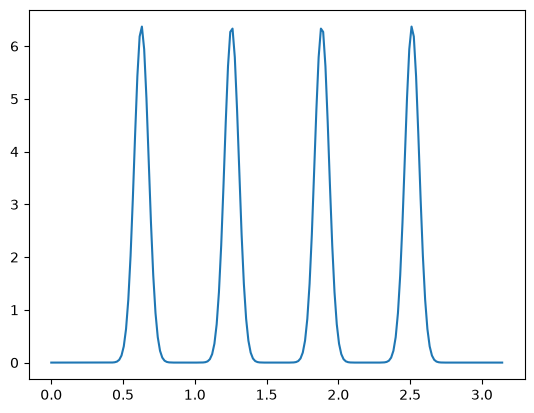
Now we create the 1D Poisson forward model as follows:
A, _, _ = Poisson1D(dim=dim,
                    endpoint=L,
                    field_type='KL',
                    field_params={'num_modes': 10} ,
                    map=lambda param: np.exp(param),
                    source=f).get_components()
Note that we parameterize the log conductivity of the rod using a Karhunen–Loève (KL) expansion which is an approach of representing a random field in terms of an orthogonal basis and corresponding weights and random coefficients. We often truncate the expansion to reduce the dimensionality of the field without loss of significant information since typically the weights decay rapidly with increasing mode (basis vector or function) number. See Alghamdi et al. (2024) for further details on KL expansion and its use in CUQIpy.
We achieve setting this parameterization here by passing KL as a field_type when defining the forward model and we specify the number of KL modes used in the expansion to 10 by passing field_params={'num_modes': 10}. Therefore from now on, we denote by x the 10 KL coefficients which the forward model expects as an input. Internally, the forward model uses the KL coefficients to construct the log conductivity of the rod and then solves the 1D Poisson equation to obtain the temperature distribution along the rod.
We print the forward model:
ACUQI PDEModel: MappedGeometry(KLExpansion[10: 201]) -> Continuous1D[200].
Forward parameters: ['x'].
PDE: SteadyStateLinearPDE.And the domain and range geometries of the forward model.
print(A.domain_geometry)
print(A.range_geometry)
MappedGeometry(KLExpansion[10: 201])
Continuous1D[200]
And inspect the domain geometry further. Let us look at the mapping in the MappedGeometry object.
print(inspect.getsource(A.domain_geometry.map)) map=lambda param: np.exp(param),
We can extract the underlying geometry of the MappedGeometry object.
underlying_geometry = A.domain_geometry.geometry
print(underlying_geometry)
KLExpansion[10: 201]
The underlying geometry represents a KL expansion of a random field. Let us look at some of the properties of this underlying_geometry such as the number of modes in the KL expansion and the grid on which the KL expansion basis functions are defined.
print(A.domain_geometry.geometry.num_modes)
print(A.domain_geometry.geometry.grid)
10
[0.         0.01570796 0.03141593 0.04712389 0.06283185 0.07853982
 0.09424778 0.10995574 0.12566371 0.14137167 0.15707963 0.1727876
 0.18849556 0.20420352 0.21991149 0.23561945 0.25132741 0.26703538
 0.28274334 0.2984513  0.31415927 0.32986723 0.34557519 0.36128316
 0.37699112 0.39269908 0.40840704 0.42411501 0.43982297 0.45553093
 0.4712389  0.48694686 0.50265482 0.51836279 0.53407075 0.54977871
 0.56548668 0.58119464 0.5969026  0.61261057 0.62831853 0.64402649
 0.65973446 0.67544242 0.69115038 0.70685835 0.72256631 0.73827427
 0.75398224 0.7696902  0.78539816 0.80110613 0.81681409 0.83252205
 0.84823002 0.86393798 0.87964594 0.89535391 0.91106187 0.92676983
 0.9424778  0.95818576 0.97389372 0.98960169 1.00530965 1.02101761
 1.03672558 1.05243354 1.0681415  1.08384947 1.09955743 1.11526539
 1.13097336 1.14668132 1.16238928 1.17809725 1.19380521 1.20951317
 1.22522113 1.2409291  1.25663706 1.27234502 1.28805299 1.30376095
 1.31946891 1.33517688 1.35088484 1.3665928  1.38230077 1.39800873
 1.41371669 1.42942466 1.44513262 1.46084058 1.47654855 1.49225651
 1.50796447 1.52367244 1.5393804  1.55508836 1.57079633 1.58650429
 1.60221225 1.61792022 1.63362818 1.64933614 1.66504411 1.68075207
 1.69646003 1.712168   1.72787596 1.74358392 1.75929189 1.77499985
 1.79070781 1.80641578 1.82212374 1.8378317  1.85353967 1.86924763
 1.88495559 1.90066356 1.91637152 1.93207948 1.94778745 1.96349541
 1.97920337 1.99491134 2.0106193  2.02632726 2.04203522 2.05774319
 2.07345115 2.08915911 2.10486708 2.12057504 2.136283   2.15199097
 2.16769893 2.18340689 2.19911486 2.21482282 2.23053078 2.24623875
 2.26194671 2.27765467 2.29336264 2.3090706  2.32477856 2.34048653
 2.35619449 2.37190245 2.38761042 2.40331838 2.41902634 2.43473431
 2.45044227 2.46615023 2.4818582  2.49756616 2.51327412 2.52898209
 2.54469005 2.56039801 2.57610598 2.59181394 2.6075219  2.62322987
 2.63893783 2.65464579 2.67035376 2.68606172 2.70176968 2.71747765
 2.73318561 2.74889357 2.76460154 2.7803095  2.79601746 2.81172542
 2.82743339 2.84314135 2.85884931 2.87455728 2.89026524 2.9059732
 2.92168117 2.93738913 2.95309709 2.96880506 2.98451302 3.00022098
 3.01592895 3.03163691 3.04734487 3.06305284 3.0787608  3.09446876
 3.11017673 3.12588469 3.14159265]
The range geometry is of type Continuous1D which represents a 1D continuous signal/field defined on a grid. We can view the grid:
print(A.domain_geometry.grid)[0. 0.01570796 0.03141593 0.04712389 0.06283185 0.07853982
0.09424778 0.10995574 0.12566371 0.14137167 0.15707963 0.1727876
0.18849556 0.20420352 0.21991149 0.23561945 0.25132741 0.26703538
0.28274334 0.2984513 0.31415927 0.32986723 0.34557519 0.36128316
0.37699112 0.39269908 0.40840704 0.42411501 0.43982297 0.45553093
0.4712389 0.48694686 0.50265482 0.51836279 0.53407075 0.54977871
0.56548668 0.58119464 0.5969026 0.61261057 0.62831853 0.64402649
0.65973446 0.67544242 0.69115038 0.70685835 0.72256631 0.73827427
0.75398224 0.7696902 0.78539816 0.80110613 0.81681409 0.83252205
0.84823002 0.86393798 0.87964594 0.89535391 0.91106187 0.92676983
0.9424778 0.95818576 0.97389372 0.98960169 1.00530965 1.02101761
1.03672558 1.05243354 1.0681415 1.08384947 1.09955743 1.11526539
1.13097336 1.14668132 1.16238928 1.17809725 1.19380521 1.20951317
1.22522113 1.2409291 1.25663706 1.27234502 1.28805299 1.30376095
1.31946891 1.33517688 1.35088484 1.3665928 1.38230077 1.39800873
1.41371669 1.42942466 1.44513262 1.46084058 1.47654855 1.49225651
1.50796447 1.52367244 1.5393804 1.55508836 1.57079633 1.58650429
1.60221225 1.61792022 1.63362818 1.64933614 1.66504411 1.68075207
1.69646003 1.712168 1.72787596 1.74358392 1.75929189 1.77499985
1.79070781 1.80641578 1.82212374 1.8378317 1.85353967 1.86924763
1.88495559 1.90066356 1.91637152 1.93207948 1.94778745 1.96349541
1.97920337 1.99491134 2.0106193 2.02632726 2.04203522 2.05774319
2.07345115 2.08915911 2.10486708 2.12057504 2.136283 2.15199097
2.16769893 2.18340689 2.19911486 2.21482282 2.23053078 2.24623875
2.26194671 2.27765467 2.29336264 2.3090706 2.32477856 2.34048653
2.35619449 2.37190245 2.38761042 2.40331838 2.41902634 2.43473431
2.45044227 2.46615023 2.4818582 2.49756616 2.51327412 2.52898209
2.54469005 2.56039801 2.57610598 2.59181394 2.6075219 2.62322987
2.63893783 2.65464579 2.67035376 2.68606172 2.70176968 2.71747765
2.73318561 2.74889357 2.76460154 2.7803095 2.79601746 2.81172542
2.82743339 2.84314135 2.85884931 2.87455728 2.89026524 2.9059732
2.92168117 2.93738913 2.95309709 2.96880506 2.98451302 3.00022098
3.01592895 3.03163691 3.04734487 3.06305284 3.0787608 3.09446876
3.11017673 3.12588469 3.14159265]
Additionally, the properties domain_dim and range_dim of the forward model represent the dimension of the input and output of the forward model, respectively.
print(A.domain_dim)
print(A.range_dim)
10
200
2.1.2. The prior 
We now build a posterior distribution based on this forward model. The unknown represents the coefficients in the KL expansion. We assume that the prior distribution of is an i.i.d Gaussian distribution with mean 0 and variance .
sigma_x = 30
x = Gaussian(0, sigma_x**2, geometry=A.domain_geometry)
Let us assume that the true solution we want to infer is a sample from x. Note: we fix the random seed for reproducibility.
np.random.seed(12)
x_true = x.sample()# your code here2.1.3. The likelihood 
We assume the data we obtain is a noisy measurement of the temperature over the interval in all grid points. The measurements form a vector . The noise is assumed to be additive Gaussian noise with mean 0 and variance .
We define the data distribution in CUQIpy in this case as
sigma_y = np.sqrt(0.001)
y = Gaussian(A(x), sigma_y**2, geometry=A.range_geometry)
We create a synthetic data to use it to test solving our BIP. We denote this data as which is a particular observed data realization from a setup where the KL coefficients are x_true. To create this data in CUQIpy, we use the following:
y_obs = y(x=x_true).sample()Let us plot the true conductivity field, corresponding to x_true, the data y_true without noise i.e. A(x_true), and the noisy data y_obs in the same plot.
y_obs.plot(label='y_obs')
A(x_true).plot(label='y_true')
x_true.plot(label='x_true')
plt.legend()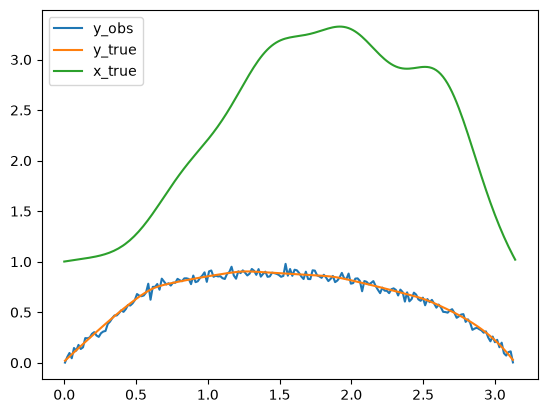
2.1.4. The posterior distribution (the high level approach: using the BayesianProblem class)
The posterior distribution of the Bayesian inverse problem in this case is given by
where we use the notation for the likelihood function to emphasize that, in the context of the posterior where is fixed to , it is a function of and not on . In CUQIpy we sometimes use the short-hand printing style L(x|y) for brevity.
The simplest way to sample a Bayesian inverse problem in CUQIpy is to use the BayesianProblem class.
Using the BayesianProblem class, one can easily define and sample from the posterior distribution of a Bayesian inverse problem by providing the distributions for the parameters and data and subsequently setting the observed data.
BP_poisson = BayesianProblem(x, y)      # Create Bayesian problem
BP_poisson.set_data(y=y_obs)           # Provide observed data
BayesianProblem with target:
Posterior(
Equation:
p(x|y) ∝ L(x|y)p(x)
Densities:
y ~ CUQI Gaussian Likelihood function. Parameters ['x'].
x ~ CUQI Gaussian.
)In the above example, we provided our assumptions about the data generating process by defining the distributions for the parameters and data and provided the observed data for the problem. CUQIpy internally created the posterior distribution using the provided distributions and data.
We can use this object to sample from the posterior distribution using the UQ method, which we will experiment with in this exercise:
# your code hereIn the previous exercise we saw that CUQIpy automatically decided on using a sampler, preconditioned Crank Nicolson pCN in this case, and sampled the posterior distribution. Additionally, the credible interval for the parameter as well as the mean of the posterior was plotted and compared to the ground truth (x_true).
Note about visualizing the credible interval:
Using the UQ method, the credible interval is computed for the KL coefficients. Then mapped to the function space and plotted. We can also compute the credible interval directly on the function values. We will revisit this at a later stage.
In the next section, we show how to define the posterior distribution more explicitly.
2.1.5. Computing the MAP point with the BayesianProblem class
In addition to sampling the posterior, we can also compute point estimates of the posterior. A common point estimate to consider is the Maximum A Posteriori (MAP) estimate, which is the value of the Bayesian parameter that maximizes the posterior density. That is,
The easiest way to compute the MAP estimate in CUQIpy is to use the MAP method of the BayesianProblem class as follows:
x_map = BP_poisson.MAP()!!!!!!!!!!!!!!!!!!!!!!!!!!!!!!!!!!!!!!!!!!!!!!!!!!!!!!!!
!!! Automatic solver selection is a work-in-progress !!!
!!! Always validate the computed results. !!!
!!!!!!!!!!!!!!!!!!!!!!!!!!!!!!!!!!!!!!!!!!!!!!!!!!!!!!!!
Optimizing with approximate gradients.
Using scipy.optimize.minimize on negative log of Posterior
x0: ones vector
x_map is the solution of the optimization problem above, which is a vector of 10 KL coefficients.
x_mapCUQIarray: NumPy array wrapped with geometry.
---------------------------------------------
Geometry:
MappedGeometry(KLExpansion[10: 201])
Parameters:
True
Array:
CUQIarray([ 14.64378212, -19.28075578, -0.2378761 , -65.51767008,
36.08881701, -16.52391658, 27.23264105, 7.31864818,
18.60115606, 5.65884568])Let us first plot the log conductivity of the rod corresponding to the MAP estimate along with the true solution x_true.
x_map.plot(label='MAP estimate')
x_true.plot(label='True solution')
plt.legend()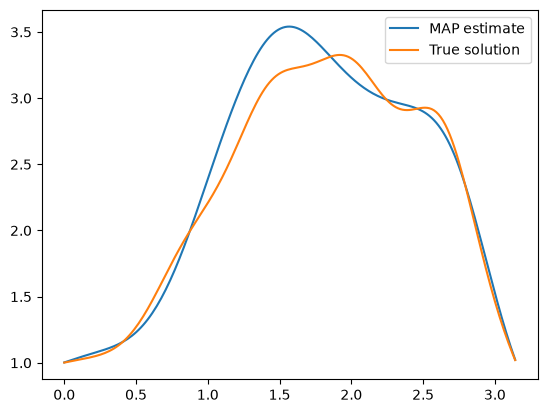
Then we look at the 10 KL coefficients and compare them with the corresponding coefficients for the true solution.
x_map.plot(label='MAP estimate' ,plot_par=True)
x_true.plot(label='True solution' ,plot_par=True)
plt.legend()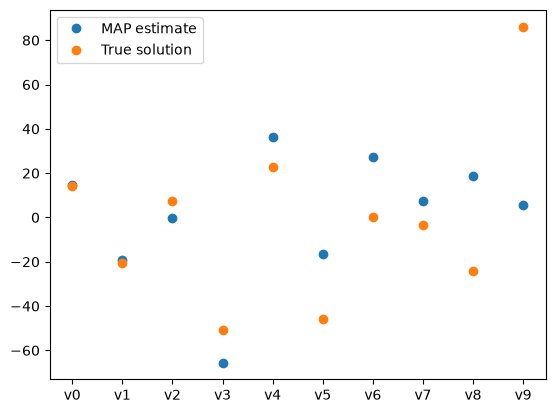
We notice that in general the larger the mode number, the harder it is to be inferred (can you think why?).
2.1.6. The posterior distribution (the low level approach: using the JointDistribution)
To define the posterior distribution explicitly in CUQIpy, we first define the joint distribution , then we supply the observed data to create the conditional distribution .
Let us first define the joint distribution in CUQIpy. We use the following:
# Define joint distribution p(y,x)
joint = JointDistribution(y, x)
Printing the joint distribution gives a nice overview matching the mathematical description of the joint distribution.
print(joint)JointDistribution(
Equation:
p(y,x) = p(y|x)p(x)
Densities:
y ~ CUQI Gaussian. Conditioning variables ['x'].
x ~ CUQI Gaussian.
)
CUQIpy can automatically derive the posterior distribution for any joint distribution when we pass the observed data as an argument to the “call” (condition) method of the joint distribution. This is done as follows:
target_poisson = joint(y=y_obs) # Condition p(x,y) on y=y_data. Applies Bayes' rule automatically
We can now inspect the posterior distribution by printing it. Notice that the posterior equation matches the mathematical expression we showed above.
print(target_poisson)
Posterior(
    Equation:
	 p(x|y) ∝ L(x|y)p(x)
    Densities:
	y ~ CUQI Gaussian Likelihood function. Parameters ['x'].
 	x ~ CUQI Gaussian.
 )
# Your code here- Alghamdi, A. M. A., Riis, N. A. B., Afkham, B. M., Uribe, F., Christensen, S. L., Hansen, P. C., & Jørgensen, J. S. (2024). CUQIpy: II. Computational uncertainty quantification for PDE-based inverse problems in Python. Inverse Problems, 40(4), 045010. 10.1088/1361-6420/ad22e8