Here we provide a simple example of how to use CUQIpy models and distributions to perform forward uncertainty quantification (UQ). The goal of this UQ analysis is to propagate uncertainty in the input of a forward model to the output. We illustrate this through a simple 1D convolution model, where we assume that the input is uncertain and described by a Gaussian distribution.
Learning objectives
Create and run a simple forward UQ analysis in CUQIpy.
Before getting started, we have to import the Python packages we need:
import numpy as np
import matplotlib.pyplot as plt
import cuqi
np.random.seed(0)
We show here the effect a chosen prior has on the data-side, a so-called forward UQ analysis. This can easily be achieved using CUQIpy models and distributions.
For this case, let us assume we have the data created from as in 1.4. Generating synthetic data , and we want to see if the prior encapsulates the measured data if we push it through forward model (ignoring noise in this case).
To do this, we first specify the forward model and our choice of an exact solution from the testproblem library:
A, _, probInfo = cuqi.testproblem.Deconvolution1D(dim=64, phantom="sinc").get_components()
x_exact = probInfo.exactSolution
And generate the observed data as we did in 1.4. Generating synthetic data :
y = cuqi.distribution.Gaussian(mean=A, cov=0.05**2)
y_obs = y(x=x_exact).sample()
Then we define our prior and generate some samples from it:
# Number of samples (try changing this)
Ns = 200

# Building blocks for defining Gaussian mean
z = np.zeros(20); o = 0.5*np.ones(24)

# Prior distribution
x = cuqi.distribution.Gaussian(np.hstack((z,o,z)),0.5)

# Sample prior
xs = x.sample(Ns)
We then plot a credible interval for the prior and compare with .
xs.plot_ci(95, exact=x_exact)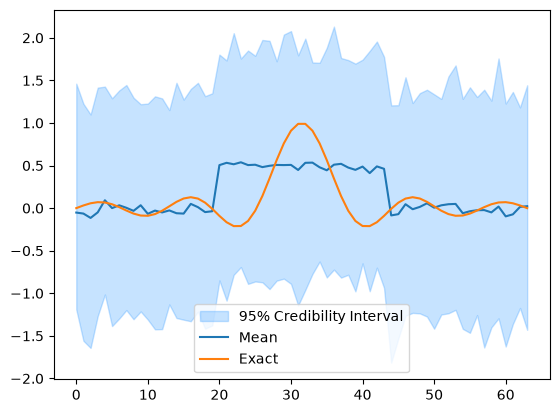
To perform the forward UQ analysis and compare on the data-side, we essentially have to compute the forward for each sample.
This would normally be done with for loop. However, because xs is a CUQIpy samples object and A is CUQIpy model, we can simply call the forward on the entire samples object (where once again the range geometry is passed from the model to the Samples on the data side).
ys = A.forward(xs) #Notation A@xs or even A(xs) would also have workedWe then compare the push-forward samples with the data generated earlier
ys.plot_ci(95, exact=y_obs)
plt.legend(['95% Credible interval', 'Mean of push-forward prior', 'Actual data', ])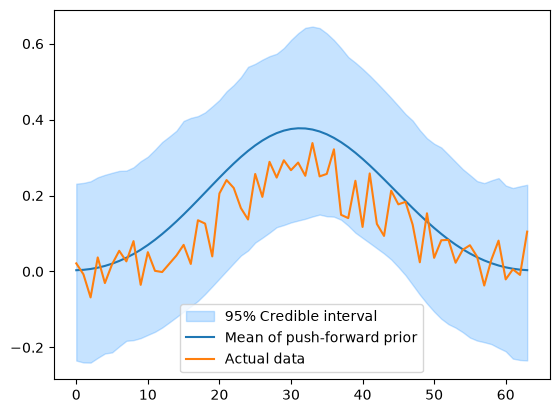
In this case the actual data is within the credible interval of the push-forward prior, which is a good sign that the prior is a good representation of the exact solution.
This kind of forward UQ analysis is the stepping stone to the more general prior-predictive analysis, which is beyond the scope of this book.